Alerts & Activity
See this on a live example →Alerts are how Horotics tells you something changed. This is the most useful page to understand, so we'll take it slowly.
How alerts work
Horotics quietly checks your equipment over and over, all day. When something changes — a device stops answering, a camera drops off, Wi-Fi gets congested — it writes a line on the Activity page and, if you've asked it to, sends you a message.
What's on the page
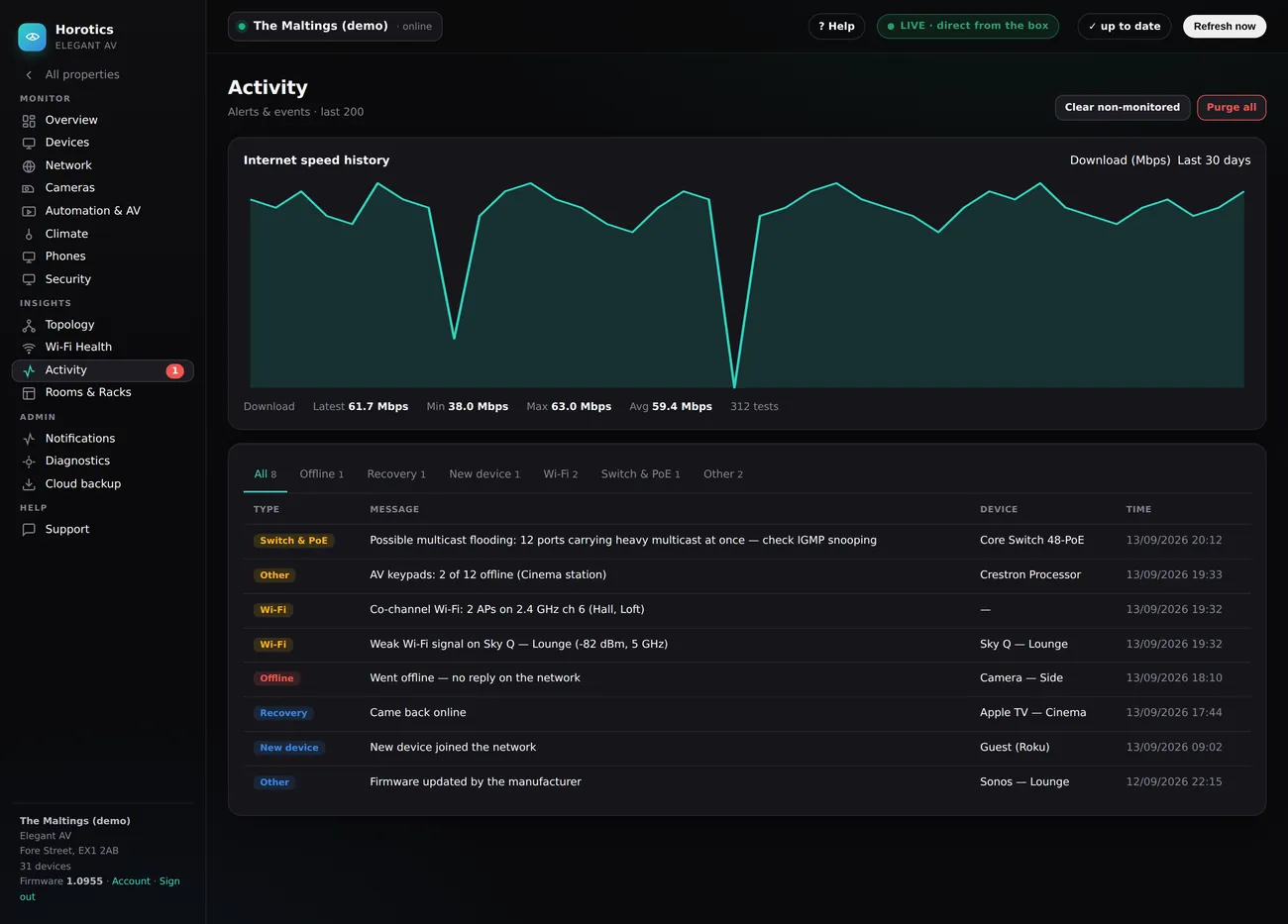
- Internet speed history (top) — a 30-day chart of your broadband download speed, with Latest / Min / Max / Avg and how many tests it's based on. The deep dips are moments your line slowed or dropped.
- Filter tabs — All, Offline, Recovery, New device, Wi-Fi, Switch & PoE, Other, each with a count. Click one to show only that kind of event.
- The list — one row per event with a coloured Type chip, a plain-English Message, the Device it's about, and the Time. Newest first.
- Clear non-monitored / Purge all (top-right) — tidy the list. These only clear the history shown here; they never change or remove your actual equipment.
Understanding the colours
- problem Red — something is actually wrong and probably needs looking at (e.g. a device went offline).
- warning Amber — a heads-up. Not broken, but heading the wrong way (e.g. Wi-Fi getting busy).
- info Grey — just news. A device came back, or updated itself. Nothing to do.
Why you're getting a particular alert
Every alert names the device and says, in plain English, what changed — "went offline", "channel busy", "came back online". The wording is deliberately kept simple, and your installer can explain any specific one in seconds.
How to stop the ones you don't want
- Snooze it — mute one device for a while (say the garden camera is off for maintenance). It stops nagging you but Horotics keeps watching.
- Stop monitoring it — for a guest gadget you don't care about, tell Horotics to leave it alone. No more alerts from it.
- Choose what reaches you — be told about red problems only, and let amber and grey just sit on the Activity page for when you fancy a look.
How to set up alerts (where they go)
By default alerts just appear on this page. To get a message when something happens, tell Horotics where to send it — a one-time setup:
- Open Account → Notifications from the menu.
- Pick how you'd like to be reached — email, Telegram, WhatsApp or Slack — and follow the short connect steps for that one.
- Add the people who should get alerts (their email or number).
- Choose how much to be told: everything, or only red "problem" alerts. Most people pick problems-only so they're not pestered.
- Send the test message to check it arrives — and you're done.
You're always in control: change the channel, the people, or the severity any time in Account → Notifications. Turn it all off and alerts simply stay on the Activity page.
What the results mean — and how they affect performance
- Does watching slow my system down? No. Horotics runs on its own little box and listens far more than it talks, so the checking is featherlight — it doesn't slow your Wi-Fi, TVs or internet.
- What do the results tell me? They're an early-warning system. A device that keeps briefly dropping, or Wi-Fi airtime creeping up week on week, is often the first sign of a cable going bad or a channel getting crowded. Catching it here means a tidy planned fix instead of a "nothing works" emergency.
Still stuck? Your installer can see the same screens you can and sort most things remotely — there's a Support button inside your Horotics portal.