Network & switches
See this on a live example →Your network is the plumbing that connects everything. This page is the same device list as Devices, filtered to just your network kit — the gateway, switches, Wi-Fi points, storage and power.
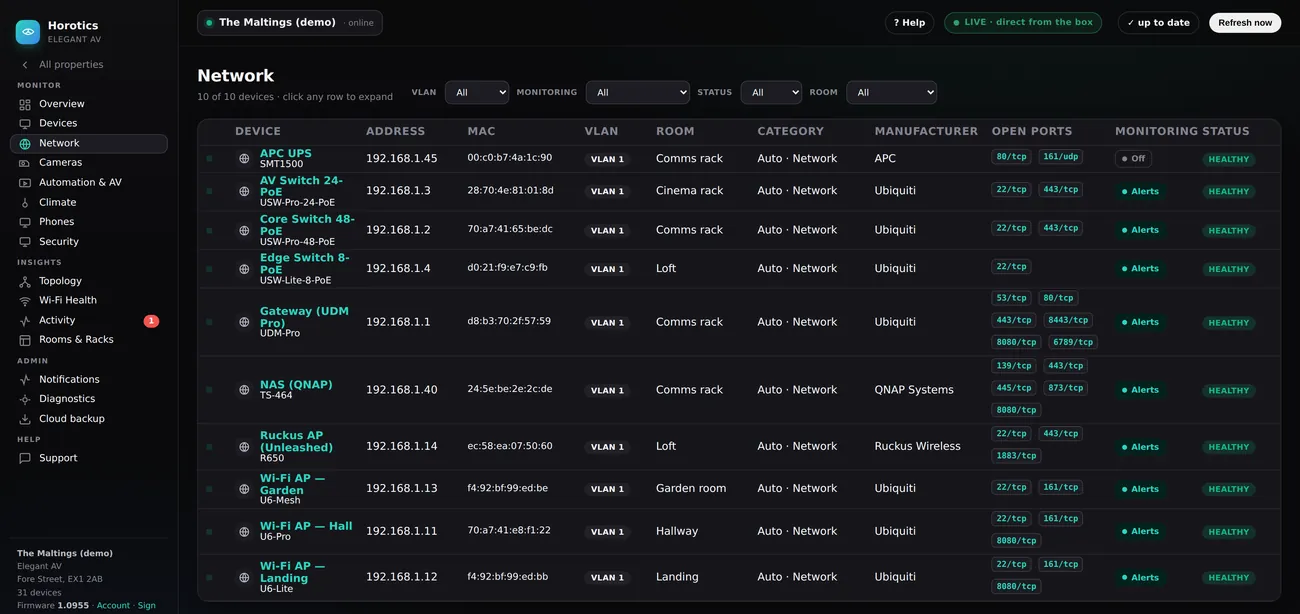
It’s the Devices table, filtered
Everything about the columns, the filter bar and clicking a row is exactly as on the Devices help page — this is the same table, just narrowed to network gear. The left menu and top strip are the same as everywhere (see the Overview page). You’re on Network in the menu here.
In plain terms
- A gateway (or router) is the front door to the internet — usually the device on the address ending .1.
- A switch is a box with lots of network sockets. Your TVs, speakers, cameras and Wi-Fi points all plug into one. You’ll often see a Core switch and one or two smaller ones.
- A port is one socket on a switch. Some ports also deliver power (PoE) to things like cameras and Wi-Fi points, so they need no separate plug.
- A Wi-Fi access point (AP) is what actually broadcasts your Wi-Fi — there’s usually more than one around the house.
Opening a switch
Click a switch’s row and it expands to show a picture of its ports — each socket coloured by speed, with the powered (PoE) ports marked, and what’s plugged into each one. It’s the quickest way to see, for example, which port a particular camera is on. Everything else expands to its identity and open ports, exactly like the Devices page.
Why you’d care
If a whole group of things goes quiet at once, it’s usually one switch or one cable — not twenty separate faults. Horotics understands the wiring (see the Topology page), so it points at the real cause instead of drowning you in alarms.