The Devices list
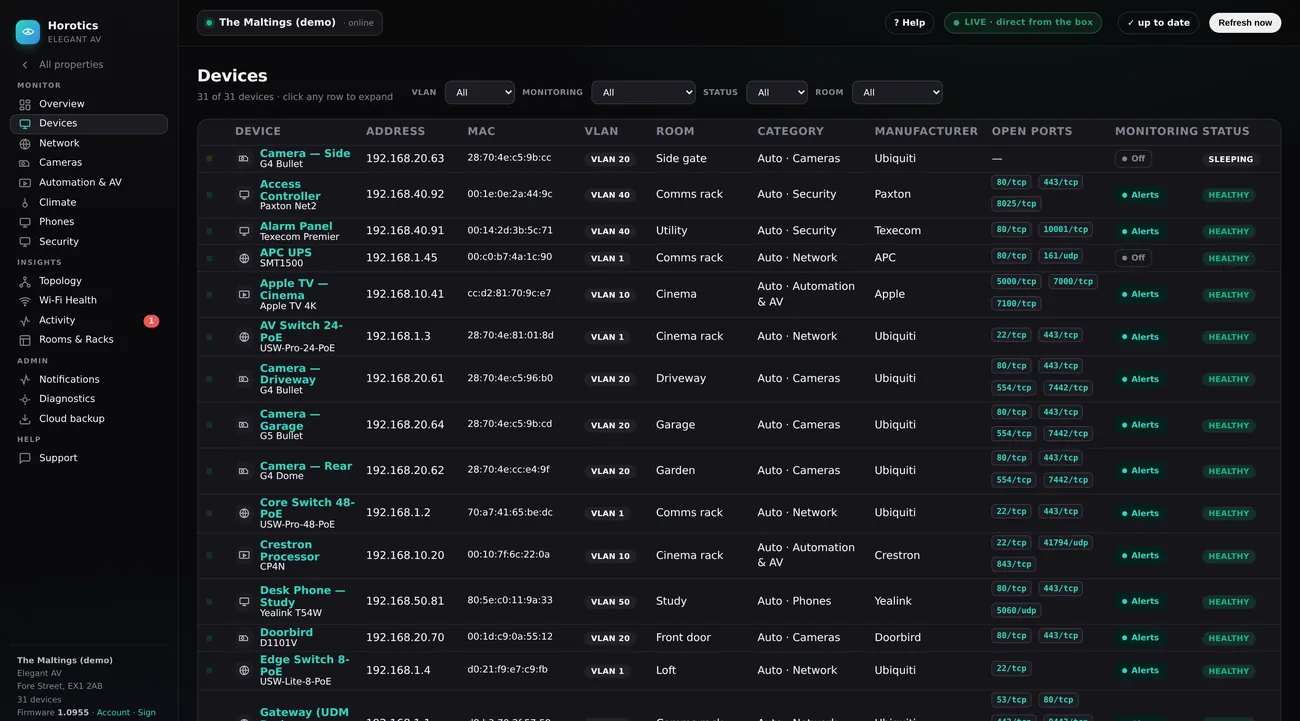
See this on a live example →This is the list of every piece of equipment Horotics is watching — TVs, speakers, cameras, switches, heating, the lot. One row per device, laid out in exactly the same columns you see on the box itself.
The menu and the top strip
The dark menu down the left and the thin status strip across the top are the same on every page — they’re explained in full on the Overview help page. In short: the menu moves you between areas (you’re on Devices here), and the top strip shows the site’s online dot, a ? Help button, whether you’re seeing LIVE or a stored Snapshot, and a Refresh now button.
The filter bar (the four boxes at the top)
These narrow the list — pick from any and they combine, so you can drill right down. Nothing here changes your equipment; it only changes what’s shown.
- VLAN — show only devices on one network lane (e.g. Cameras, AV).
- Monitoring — show only devices set to Alerts, or only those set to Off.
- Status — show only Online or only Offline devices.
- Room — show only the kit in one room.
The count under the title (“31 of 31 devices”) updates as you filter, so you can see how many match.
The columns, explained
- Status dot (far left) — a quick colour: green healthy, amber asleep/offline but not alerting, red a monitored device that’s down.
- Device — its name (in teal — click it to open the device), with the make/model underneath.
- Address — its IP, its “phone number” on your network.
- MAC — its permanent hardware ID (never changes, even if the IP does). Handy when an installer needs to pin down exactly which unit.
- VLAN — which network lane it lives on (e.g. VLAN 20 for cameras), for keeping traffic tidy and secure.
- Room — where it is.
- Category — what kind of thing it is (Network / Cameras / Automation & AV / Climate…). Horotics works this out for you automatically; pick a different one from the dropdown only if it's got a device wrong.
- Manufacturer — who makes it.
- Open Ports — the “doors” it has open for services (e.g. a camera’s video stream), shown as little pills. Mostly of interest to your installer.
- Monitoring — whether Horotics is actively alerting on this device (Alerts) or leaving it be (Off).
- Status — HEALTHY (working), OFFLINE (not answering but not alarmed — a TV that’s off, or something unplugged), or DOWN in red (a monitored device that should be up but isn’t).
Opening a device (what the clicks do)
- Click any row — it expands in place to show that device’s full detail: its identity (IP, MAC, model, firmware, VLAN, room, when it was first and last seen) and its open ports. For a switch, it also draws a picture of the switch’s ports so you can see what’s plugged into each socket.
- Click the device’s name — opens the same device, straight to its detail.
- Click the row again — closes it.